

Type “Landmark 81” into a checkout field and pause. The next useful thing is a short list of places, not a silently chosen coordinate. After the customer selects the intended building, the application can resolve its location and ask whether that point is the receiving entrance. That two-stage interaction is the foundation of a dependable Vietnam address search integration.
TrackAsia documents Autocomplete v2 for suggestions and Place Detail v2 for information retrieved with a place_id. Search v2 serves a related but distinct purpose when the application already has a fuller query.[2][3][4] This tutorial builds the suggestion-to-detail flow first, then explains the decisions needed to turn a working input field into an operational address record.
Try the entire flow in one HTML file
Save the following as address-demo.html and open it in a modern browser. The sample uses the documented limited public_key for testing.[2][4] It is not a production quota or a private credential. If your browser blocks requests from a local file, serve its directory with python3 -m http.server 8080 and open http://localhost:8080/address-demo.html.
The example deliberately shows the resolved record as text. That keeps the first exercise focused on request order and data mapping rather than introducing map rendering at the same time. It provides suggestions, ordinary keyboard-accessible buttons, cancellation, a pause before requesting and explicit failure messages. A production combobox can add arrow-key navigation while preserving the same request logic.
<!doctype html><html lang="en"><meta charset="utf-8"><meta name="viewport" content="width=device-width"><title>TrackAsia address search</title><style>body{max-width:700px;margin:32px auto;padding:16px;font:17px/1.6 system-ui}input,button{font:inherit;padding:10px}input{width:90%}button{display:block;margin:8px 0;text-align:left;width:100%}pre{white-space:pre-wrap;overflow-wrap:anywhere}#status{min-height:2em}</style><h1>Find and confirm an address</h1><p>Limited public test key. Select a suggestion to resolve coordinates.</p><label for="query">Address or place</label><input id="query" autocomplete="off" placeholder="Landmark 81"><p id="status" role="status"></p><div id="results"></div><pre id="selected"></pre><script>
const input=document.querySelector('#query');
const list=document.querySelector('#results');
const status=document.querySelector('#status');
const selected=document.querySelector('#selected');
let timer,controller,version=0;
async function request(path,params,signal){
const url=new URL('https://maps.track-asia.com/api/v2/place/'+path+'/json');
url.search=new URLSearchParams({...params,key:'public_key',new_admin:'true',include_old_admin:'true'});
const response=await fetch(url,{signal});
if(!response.ok)throw new Error('HTTP '+response.status);
const data=await response.json();
if(data.status==='ZERO_RESULTS')return data;
if(data.status!=='OK')throw new Error(data.status||'Invalid response');
return data;
}
input.addEventListener('input',()=>{
clearTimeout(timer);controller?.abort();version++;
const current=version,text=input.value.trim();
list.replaceChildren();selected.textContent='';status.textContent='';
if(text.length<3)return;
controller=new AbortController();const signal=controller.signal;
timer=setTimeout(async()=>{
status.textContent='Searching…';
try{
const data=await request('autocomplete',{input:text,size:'5'},signal);
if(current!==version)return;
const items=data.predictions||[];
status.textContent=items.length?'Select a place.':'No results. Try more context.';
for(const item of items){
const button=document.createElement('button');button.type='button';
button.textContent=item.description||item.name||item.place_id;
button.addEventListener('click',()=>choose(item,current));list.append(button);
}
}catch(error){if(error.name!=='AbortError'&¤t===version)status.textContent='Search failed: '+error.message;}
},300);
});
async function choose(item,current){
controller?.abort();controller=new AbortController();
list.replaceChildren();status.textContent='Loading place…';
try{
const data=await request('details',{place_id:item.place_id},controller.signal);
if(current!==version)return;
const place=data.result,point=place?.geometry?.location;
if(!Number.isFinite(point?.lat)||!Number.isFinite(point?.lng))throw new Error('No usable coordinates');
input.value=place.formatted_address||item.description;
selected.textContent=JSON.stringify({place_id:place.place_id,address:place.formatted_address,old_address:place.old_formatted_address??null,lat:point.lat,lng:point.lng},null,2);
status.textContent='Place selected. Confirm the delivery entrance in your application.';
}catch(error){if(error.name!=='AbortError'&¤t===version)status.textContent='Place failed: '+error.message;}
}
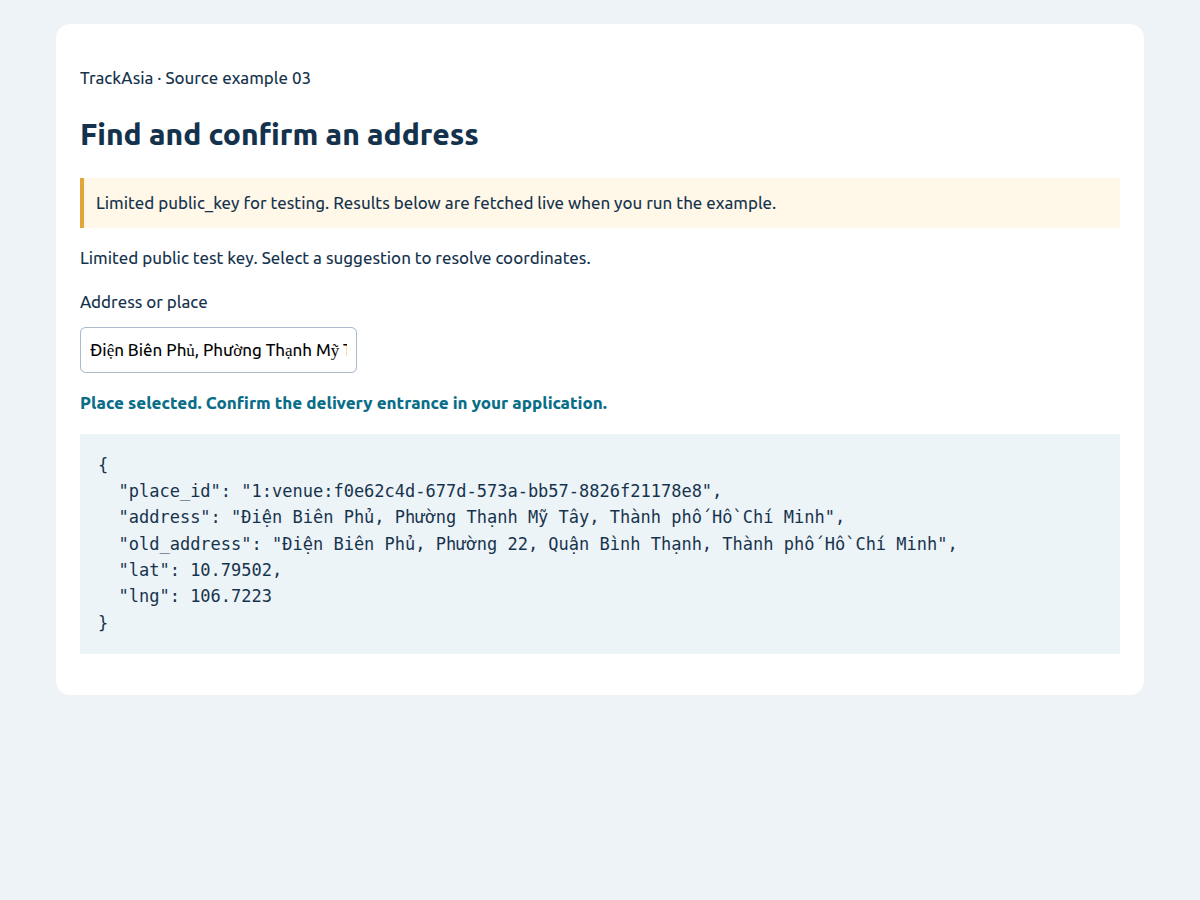
</script></html>Type at least three characters, wait for suggestions and choose a result. The threshold and 300-millisecond delay are application settings chosen for this example; they are not requirements or performance promises from TrackAsia. The output should contain a provider identifier, current formatted address, optional old address and named latitude and longitude values. The exact place ordering and returned content can change as data changes.
The final message asks the application to confirm the delivery entrance. It does not claim that choosing a place has completed every address-validation task. That distinction matters for apartment towers, industrial sites and buildings whose public map location differs from a loading gate.
Why are there two API requests?
Autocomplete returns a candidate list. Its documented predictions include place_id, description, formatted_address and display-oriented information such as structured_formatting.[2] The user uses that context to choose the intended place. Fetching full details for every suggestion would add work before knowing which candidate is relevant.
After a selection, pass that candidate's identifier to /api/v2/place/details/json. The documented response puts place information under result, with coordinates under result.geometry.location.lat and .lng.[4] Do not look for those coordinates at the root of an autocomplete prediction or assume a provider identifier is itself a latitude and longitude.
Use URLSearchParams rather than concatenating the query. Vietnamese diacritics, spaces and punctuation need proper URL encoding. The request helper also keeps the administrative options consistent between suggestions and details, so the address shown before and after selection does not change because two calls used different settings.
The helper checks HTTP status and the JSON status. HTTP 200 means a response was delivered; the response can still report no results or an application error. ZERO_RESULTS leads to an empty-state message. An invalid request or unavailable service should remain distinguishable from a successful search that found nothing.[2][4]
Stop old requests from changing a newer selection
Imagine a person types “Land”, pauses briefly, then completes “Landmark 81”. If the first request is slow, it can arrive after the second. Without protection, the field appears to move backwards. This is an application race condition, not evidence that the search service misunderstood the latest text.
The example uses two protections. AbortController cancels the previous request when typing continues. A monotonically increasing version also prevents an obsolete response from rendering. Cancellation reduces unnecessary client work; the version check protects state even if a response completed just before cancellation.
Editing the input clears the selected record immediately. Keeping old coordinates while allowing new text creates a dangerous mismatch: the screen says one address while the order retains another location. Treat “typing”, “suggestions shown” and “place selected” as different states, even if the interface is visually simple.
The same principle applies to a detail lookup. A user can select a suggestion and then start typing again before details arrive. The response should not overwrite that new input. The selection handler checks the version before writing the resolved record.
Map the response into your order model
Do not save the entire response as the only business address. Create an explicit application record. A useful starting model contains original_input, provider, place_id, formatted_address, old_formatted_address, lat, lng, confirmation_state and confirmed_at. These are proposed application fields, not a required TrackAsia schema.
Keep original input separately before changing the input box to the formatted address. In the minimal demo, the field is replaced for readability; an actual checkout should preserve the initial customer wording in its order state. That text often contains context that a standard address intentionally does not include, such as an internal building label.
A place identifier belongs to its provider. Do not feed a TrackAsia identifier into another provider's detail endpoint or use it as your universal customer primary key. Keep your own customer or site ID, then store the provider identifier as one piece of location provenance.
Store coordinates as numbers with named properties. When adding a map, convert to that library's expected representation in one place. When calling another API, check its own coordinate convention; TrackAsia Directions v2 and VRP v1 use different documented representations.[5][6] This small boundary rule prevents errors that can otherwise look like bad search results.
Try the source: Find and confirm an address
Type Landmark 81, select a suggestion, then inspect place details and returned coordinates.
API examples use the limited public_key; the image captures a run of the source below.
Unzip, run python3 -m http.server 8080 in the extracted folder, then open http://localhost:8080/index-en.html. Vietnamese and English READMEs are included; no npm or build step is needed.
What should old and new administrative names do?
The v2 documentation provides new_admin=true and include_old_admin=true; old-administration output is available with the new-administration option enabled.[2][4] The demo requests both consistently. It reads the old formatted address only if present rather than building a required form field around an optional property.
Use current and older wording for distinct purposes. A current address can support present-day display, while an older form can help users recognise a place or support staff interpret an existing record. Do not automatically rewrite the address printed on a completed order just because the current lookup returns a different administrative presentation.
Address components should be parsed by their types, not by array position. A component at index two is not guaranteed to represent the same administrative level in every response. The detail documentation describes component names, types and administrative identifiers, with fields available according to the result.[4]
Avoid enforcing an unnecessary three-level hierarchy in the application. An address should remain usable when the returned structure does not contain the intermediate level your older database expected. If downstream accounting or reporting requires a particular administrative code, make that a separately validated integration rule rather than inventing missing values in the browser.
When should you use Search instead?
A person entering an address benefits from a changing suggestion list. A dispatcher pasting a complete address or an import process looking up an already assembled query may fit Search better. TrackAsia documents Search v2 separately from Autocomplete.[2][3] Choose based on the interaction and actual response fields rather than assuming the two endpoints are interchangeable.
Do not run bulk address cleanup by pretending every record is a live autocomplete interaction. Define what a successful match means, how ambiguous candidates will be reviewed and where the original text is retained. A first-ranked candidate is not automatically a confirmed business location.
For a delivery order, confirmation can include a map pin, an entrance note and a deliberate user action. Keep a manually adjusted delivery point separate from the provider's reference location. Otherwise a site-specific correction may be lost the next time details are refreshed.
Empty results need a path forward
A customer who cannot find an address still needs a clear next action. Offer more context, manual entry or a review flow appropriate to the business. Mark manually entered information as unconfirmed rather than displaying the same visual success state as a resolved and checked point.
If suggestions look irrelevant, inspect the actual query and optional geographic context before changing the matching logic. The Autocomplete documentation includes a location parameter in latitude,longitude form.[2] Use such context only when the application has a meaningful reference point; a stale device location can bias the experience in an unhelpful direction.
If nothing appears, start with the browser network panel. Confirm the endpoint, HTTP status, application status and response structure. If a local file is blocked but localhost works, the issue is the browser origin rather than the spelling of the address. A successful server-side request alone does not prove the browser can make the same cross-origin call.
When detail lookup fails after a selection, preserve the candidate text but do not silently mark coordinates as confirmed. Let the person retry or return to suggestions. An error message should say that place information could not be loaded; it should not falsely say the address does not exist.
Prepare production without making the demo harder to try
Replace the public test key with an account configuration suited to the deployment. Confirm the supported restrictions, usage rules and current commercial limits directly. Browser-visible keys are visible to the user; do not put a backend secret into this HTML or describe client code as a secure hiding place.
A backend proxy may help centralise access control and operational logging, but it adds another service to operate. Choose it when those responsibilities are genuinely required, not as a ritual prerequisite to trying suggestions. In either design, limit sensitive address data in logs and retain a correlation ID that support can use without exposing every customer's full destination.
Monitor user interactions as well as requests. Useful proposed measures include time to confirmed address, empty-result rate, manual correction rate and abandoned entries. Count retries and detail failures separately. A rise in request volume may reflect people struggling rather than useful growth.
Before opening the feature to customers, test unaccented queries, duplicated building names, incomplete addresses, network interruption, a late response and editing after selection. Have an operator check actual entrances for representative sites. The integration is ready when it helps a person confirm a usable location and handles uncertainty honestly—not merely when the first suggestion appears.