

A spreadsheet contains 8,000 customer addresses, and the reporting team needs a map by tomorrow. It is tempting to call an address-to-coordinate API for every row and save the first latitude and longitude. That produces a file quickly; it does not establish that the points represent the customers. A street result, a building centre and a delivery entrance can all look equally precise in a spreadsheet.
With TrackAsia, a practical starting point for a complete address is Search v2: submit query to Text Search and inspect the returned candidates before accepting a location.[1] The workflow below keeps the original address, produces a reviewable result and can resume without sending successful rows again. It is intended for address-file processing, rather than the interactive autocomplete flow used while a customer types.
What exactly are you trying to locate?
Start by deciding what the coordinate will support. An analyst colouring districts may accept a locality-level result. A branch finder needs the actual premises. A delivery workflow may need a particular gate, with a separate note for the receiving desk. These are different acceptance rules, even when the same API supplies candidates.
Write that rule before processing the file. For example, “a reviewer must confirm the building and the appropriate entrance before the point becomes dispatchable” is actionable. “Get accurate coordinates” is not: it gives the developer no way to handle a plausible but incomplete response. Keep the search result separate from any entrance coordinate later confirmed by staff. Otherwise a manual correction can be overwritten the next time an import runs.
The service resolves a query against its location data. Your application remains responsible for deciding whether a candidate belongs to this customer, obtaining clarification and tracking approval. Do not interpret the presence of geometry.location as permission to skip those decisions.
Prepare the address without destroying useful detail
Give every input row a stable internal ID. Keep rawAddress unchanged and build a separate query by trimming outer whitespace and collapsing repeated spaces. Do not remove slashes from house numbers, strip accents indiscriminately or discard a building name because it is not a street. Those transformations can remove the very information needed to distinguish two locations.
Keep apartment numbers, contact names and access instructions in appropriate business fields. Some instructions may help a human but make a search query less useful. A sensible correction is to retain “call reception on arrival” in an access note and search the building address. Record that correction so the reviewer can see what was submitted, rather than silently pretending the original input was complete.
For customer data, also decide which fields may leave your system. There is usually no reason to send an order value, a recipient telephone number or the customer’s entire profile with an address request. Limit access to review files and set retention rules before a large export is created.
Make one request and read its meaning
Text Search v2 uses the endpoint below. Its documentation describes results, formatted_address, geometry.location, types and partial_match, with optional old administrative-address information when requested.[1] The public example key is limited and for testing only; production needs your own appropriately configured key.[1]
curl -G 'https://maps.track-asia.com/api/v2/place/textsearch/json' \
  --data-urlencode 'query=Landmark 81, Ho Chi Minh City' \
  --data-urlencode 'new_admin=true' \
  --data-urlencode 'include_old_admin=true' \
  --data-urlencode 'key=public_key'
An HTTP success means the server returned a response; inspect the application’s status as well. An OK response still requires checking that results is an array and that each usable candidate has finite coordinates. An empty result should become a searchable exception in your own system, not the coordinate (0,0).
Read the returned address next to the input. Does the road match? Is the province or city consistent? Is the result a building, a route or an administrative area? A partial_match flag deserves attention, but its absence is not a certificate of rooftop or entrance accuracy. Where ambiguity remains, show candidates and let an authorised person choose.
A complete resumable example in Node.js
Save the following as geocode.mjs. It runs with Node.js 20 or later and uses built-in fetch and file functions. The embedded records are demonstration inputs, not customer records. Run node geocode.mjs for the limited public-key trial, or set TRACKASIA_KEY in your local environment for an account key. Do not commit that value to a repository.
import { readFile, appendFile } from 'node:fs/promises';
const rows = [
  { id: 'demo-001', rawAddress: 'Landmark 81, Ho Chi Minh City' },
  { id: 'demo-002', rawAddress: '  Landmark 81,  Ho Chi Minh City  ' }
];
const output = 'geocode-results.jsonl';
let previous = '';
try { previous = await readFile(output, 'utf8'); }
catch (e) { if (e.code !== 'ENOENT') throw e; }
const done = new Set(previous.trim().split('\n').filter(Boolean)
  .map(line => JSON.parse(line))
  .filter(row => row.state !== 'retry')
  .map(row => row.id));
for (const row of rows) {
  if (done.has(row.id)) continue;
  const query = row.rawAddress.trim().replace(/\s+/g, ' ');
  const record = { ...row, query, checkedAt: new Date().toISOString() };
  try {
    const url = new URL('https://maps.track-asia.com/api/v2/place/textsearch/json');
    url.search = new URLSearchParams({ query,
      key: process.env.TRACKASIA_KEY || 'public_key',
      new_admin: 'true', include_old_admin: 'true' });
    const response = await fetch(url, { signal: AbortSignal.timeout(15000) });
    if (!response.ok) throw new Error(`HTTP ${response.status}`);
    const body = await response.json();
    record.providerStatus = body.status;
    if (body.status !== 'OK' && body.status !== 'ZERO_RESULTS') {
      throw new Error(`API ${body.status || 'unknown'}`);
    }
    record.candidates = (body.results || []).map(result => ({
      placeId: result.place_id,
      address: result.formatted_address,
      oldAddress: result.old_formatted_address ?? null,
      location: result.geometry?.location,
      types: result.types || [],
      partial: result.partial_match ?? null
    })).filter(result => Number.isFinite(result.location?.lat)
      && Number.isFinite(result.location?.lng));
    record.state = record.candidates.length ? 'review' : 'unresolved';
  } catch (error) {
    record.state = 'retry';
    record.error = error.message;
    process.exitCode = 1;
  }
  await appendFile(output, JSON.stringify(record) + '\n');
}
console.log(`Review ${output}; candidates are not automatically approved.`);
Each output line maps one source ID to its submitted query and candidate list. address comes from formatted_address; location comes from geometry.location; oldAddress is preserved only if returned. review, unresolved and retry are application states chosen by this example, not TrackAsia response statuses. No row is automatically labelled confirmed.
Run the program twice: the second execution skips completed source IDs. To retry a corrected unresolved address, use a new versioned input ID or deliberately reopen that record in a real job system. Do not edit the input underneath an already completed ID and expect this minimal checkpoint file to notice. For production, use a database with an input-version field and a transaction-safe job queue.
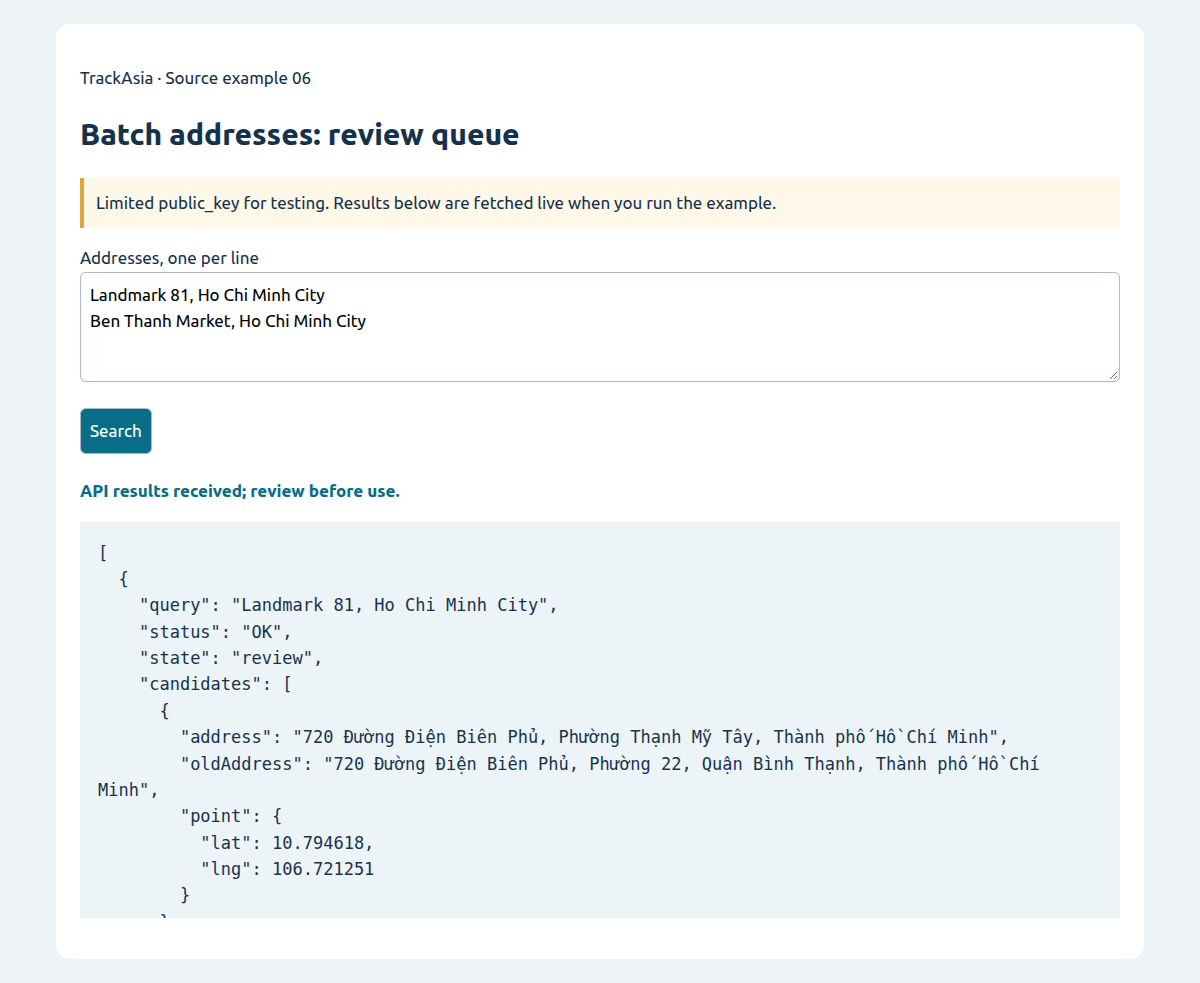
Try the source: Batch addresses: review queue
Paste one address per line; retain each query and candidates for review rather than auto-approving coordinates.
API examples use the limited public_key; the image captures a run of the source below.
Unzip, run python3 -m http.server 8080 in the extracted folder, then open http://localhost:8080/index-en.html. Vietnamese and English READMEs are included; no npm or build step is needed.
How should old and new administrative names be stored?
Search v2 documents new_admin=true and include_old_admin=true; the latter requests old information alongside the new form.[1] Preserve the raw input separately from the returned formatted address. This allows an old document to remain understandable without forcing an obsolete label into every new screen.
A useful business record has a current display address, any returned old address, a provider identifier, a coordinate and the time of resolution. It should also retain the reviewed coordinate and reviewer if a person later corrects the location. Optional fields must remain optional. A missing old_formatted_address does not justify constructing an old address from guesswork or assuming that an administrative code belongs to every house.
Renaming an administrative unit does not physically move a building. Conversely, a familiar place name does not prove that a business still occupies the same premises. Address-label maintenance and location verification should therefore be separate operations, even if they are presented in one review screen.
Failures worth designing for before the large run
A timeout or HTTP 5xx may justify a bounded retry with delay. Authentication failures need a configuration fix; repeatedly submitting the same request will not repair the key. A no-result needs better input or human review. An ambiguous result needs a decision, not increasingly aggressive retries.
The sample processes sequentially to keep the mechanism easy to inspect. It intentionally records failures rather than implementing an unattended retry storm. Before increasing concurrency, confirm account limits and add backoff, a maximum attempt count and a pause control. Keep request logs free of secret keys: a complete URL contains the key in its query string.
If the process stops while appending a line, validate the checkpoint file before resuming. The demonstration will fail on malformed JSON rather than silently ignore damaged evidence. A production worker should commit a job result atomically and expose failed jobs in an operations screen.
Duplicate inputs also deserve care. Two rows may share a building while representing different customers. You may reduce repeated work where permitted by the service terms, but do not merge their business identities. The coordinate cache and the customer table serve different purposes.
Check the result where it will actually be used
Build a review sample across your real operating areas: a well-specified street address, a building name, a rural address, an old administrative name and an incomplete record. Include difficult cases instead of testing only famous landmarks. Display the input, candidates and map together so a reviewer can explain why a candidate was accepted or rejected.
Measure unresolved records, ambiguous records, human corrections and confirmed points separately. If the application needs delivery entrances, inspect that requirement explicitly; counting non-empty latitudes is not a delivery-quality metric. Keep the review result connected to the source ID so corrections can reach the originating CRM or order system.
Once the sample behaves sensibly, increase the job size and compare actual request counts with the forecast. Ask TrackAsia to confirm the applicable throughput, billing and storage terms for that workload. The useful deliverable is a repeatable address-resolution process with visible exceptions—not merely a large file of decimal numbers.
Design the review screen around a decision
Show the original input and submitted query above the candidate list. That makes a cleaning mistake visible before the reviewer blames the search result. Place the selected candidate on a map, but keep the address text readable beside it. The reviewer should be able to reject all candidates and request clarification rather than being forced to approve something to complete the task.
Use separate actions for selecting an API candidate and confirming an operational entrance. A customer may agree that the building is correct while staff still need to identify which gate accepts deliveries. Record a reason for a manual move, such as a confirmed entrance, instead of simply replacing the provider coordinate without an explanation. A future editor can then distinguish a deliberate correction from accidental dragging.
When exporting back to the source system, include the source ID, input version, approval state and coordinate source. Do not overwrite an older approved point merely because a newer search returned first. A changed candidate should become a proposed update until the business rule allows replacement.
Keep reruns predictable when inputs change
The sample checkpoint is intentionally small. A larger process should identify a job by source ID plus an input version or a hash of the submitted query. This avoids confusing a revised address with a completed old task. Keep the original job history so a support person can explain why a location changed.
Define what happens when the provider returns several candidates after previously returning one. The safe behaviour is to reopen review, not to preserve a misleading confirmed state. Similarly, a later no-result should not erase a human-confirmed entrance automatically. Those policies belong in the application and should be exercised with a small test fixture before importing the full customer file.
Sources
[1] https://docs.track-asia.com/api-integration/search/v2