

A customer sees two pins close together and expects a short delivery. Between those pins there may be a river, a divided road or an entrance on the far side of a large site. A directions API calculates a journey over the road network rather than drawing a straight line. The integration still needs to explain the result and avoid turning a travel estimate into an unconditional arrival promise.
This guide builds a small TrackAsia Directions v2 client, then follows the response into application state, route display and practical acceptance tests. The scope is one journey between confirmed locations. Assigning many orders to several vehicles is a different problem and belongs in a route-optimisation workflow.
Start with a complete request, not a map screenshot
TrackAsia documents Directions v2 at /route/v2/directions/json. It takes an origin, destination and API key; coordinate strings use latitude,longitude. Documented modes include driving, motorcycling, walking and truck.[5] Begin with explicit coordinates so the first experiment tests routing rather than combining routing with address interpretation.
Save this complete file as directions-demo.html. Open it in a modern browser or serve the directory with python3 -m http.server 8080 and visit http://localhost:8080/directions-demo.html if local-file requests are blocked. The sample uses the documented limited public_key for testing, not a production allowance.[5]
<!doctype html><html lang="en"><meta charset="utf-8"><meta name="viewport" content="width=device-width"><title>TrackAsia directions</title><style>body{max-width:760px;margin:24px auto;padding:16px;font:17px/1.6 system-ui}input,select,button{font:inherit;max-width:100%;padding:8px}label{display:block;margin:10px 0}pre{white-space:pre-wrap;overflow-wrap:anywhere}</style><h1>Calculate a road journey</h1><p>Limited public test key. Coordinates use latitude,longitude.</p><form id="form"><label>Origin <input id="origin" value="10.761,106.68" required></label><label>Destination <input id="destination" value="10.800,106.75" required></label><label>Mode <select id="mode"><option>driving</option><option>motorcycling</option><option>walking</option><option>truck</option></select></label><button>Calculate</button></form><p id="status" role="status"></p><pre id="output"></pre><script>
let controller,version=0;
function coordinate(text){
const pair=text.split(',').map(x=>Number(x.trim()));
if(pair.length!==2||!pair.every(Number.isFinite)||Math.abs(pair[0])>90||Math.abs(pair[1])>180)throw new Error('Use latitude,longitude');
return pair.join(',');
}
document.querySelector('#form').addEventListener('submit',async event=>{
event.preventDefault();controller?.abort();controller=new AbortController();const current=++version;
const status=document.querySelector('#status'),output=document.querySelector('#output');
output.textContent='';status.textContent='Calculating…';
try{
const url=new URL('https://maps.track-asia.com/route/v2/directions/json');
url.search=new URLSearchParams({origin:coordinate(document.querySelector('#origin').value),destination:coordinate(document.querySelector('#destination').value),mode:document.querySelector('#mode').value,key:'public_key'});
const response=await fetch(url,{signal:controller.signal});
if(!response.ok)throw new Error('HTTP '+response.status);
const data=await response.json();
if(data.status!=='OK'||!data.routes?.length)throw new Error(data.status||'No route');
if(current!==version)return;
const route=data.routes[0],legs=route.legs||[];
if(!legs.length||!legs.every(x=>Number.isFinite(x.distance?.value)&&Number.isFinite(x.duration?.value)))throw new Error('Incomplete route');
const metres=legs.reduce((n,x)=>n+x.distance.value,0),seconds=legs.reduce((n,x)=>n+x.duration.value,0);
output.textContent=JSON.stringify({summary:route.summary,metres,seconds,kilometres:(metres/1000).toFixed(1),minutes:Math.ceil(seconds/60),legs:legs.map(x=>({start:x.start_location,end:x.end_location,metres:x.distance.value,seconds:x.duration.value})),polyline:route.overview_polyline},null,2);
status.textContent='Journey estimate ready. Stop service time is separate.';
}catch(error){if(error.name!=='AbortError'&¤t===version)status.textContent='Route failed: '+error.message;}
});
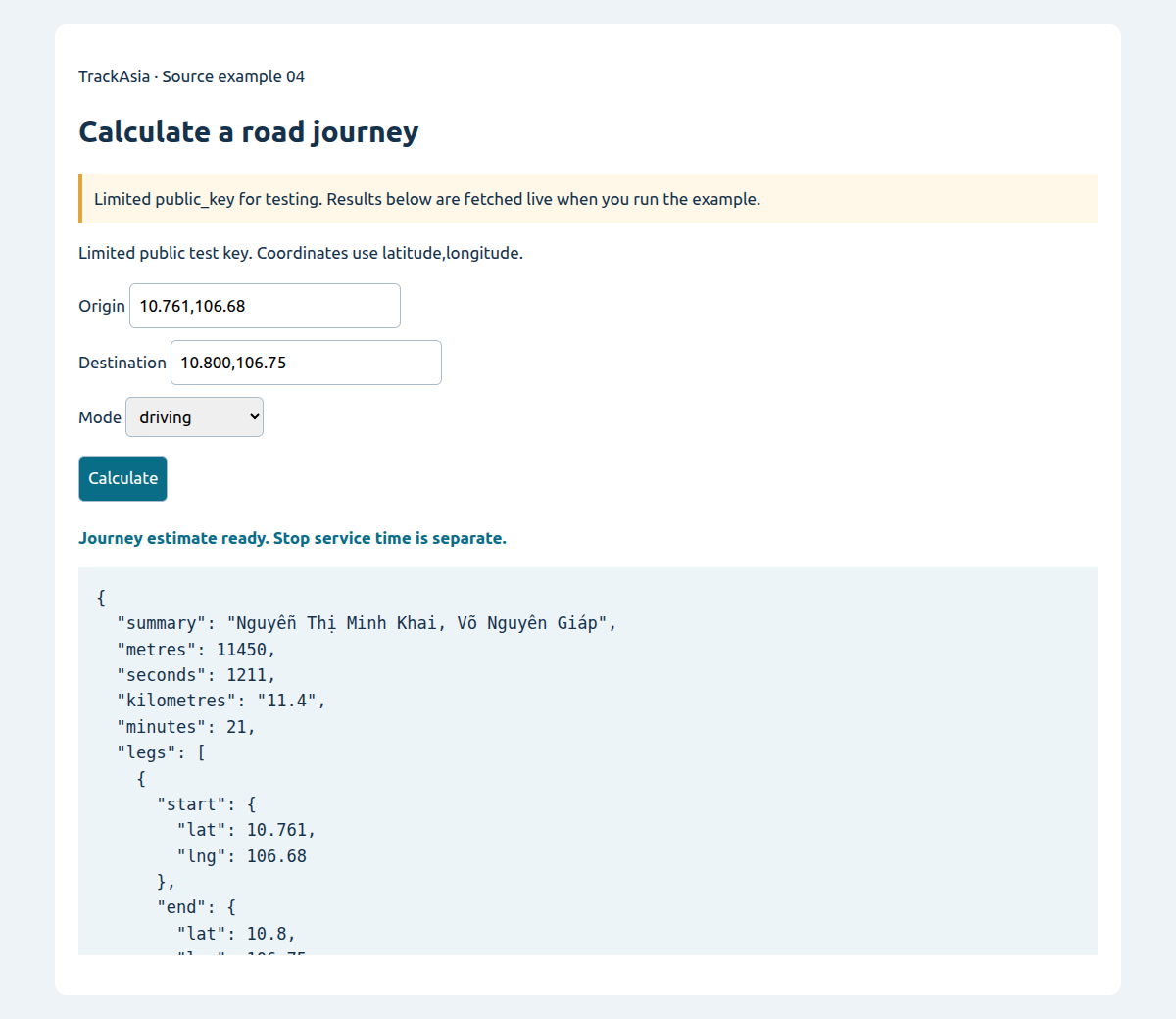
</script></html>Click Calculate with the supplied points, then change the destination or mode. The output exposes metres, seconds, display conversions, individual legs and the overview geometry. It deliberately avoids a map dependency so you can inspect the request-to-response contract first. A successful response for one pair is a functional test, not evidence that every vehicle or destination is suitable.
The coordinate validator checks numerical shape and global ranges. It does not certify that a point is inside your operating area or on a usable access road. Add those business checks when the feature moves beyond an integration exercise.
Read the request contract before reusing coordinates
A location object with named lat and lng values is a safer internal representation than an unexplained pair of numbers. Directions v2 expects the string in latitude,longitude order.[5] Other services can use another representation; TrackAsia VRP v1 documents coordinate arrays as longitude,latitude.[6] Convert at the service boundary rather than copying a string or array from a different integration.
Directions can also accept an address string according to the documentation.[5] That is convenient for an exploratory request. For a production delivery flow, resolving and confirming the location first gives the customer and operator a chance to catch an ambiguous place before calculating travel time.
Use URLSearchParams for all values. This becomes especially useful with address text and waypoint separators. Hand-built URLs are harder to review and can break when input contains spaces, accents or punctuation. Keep the endpoint version explicit in the integration module so a future change is deliberate.
The demo sends a new request only when the form is submitted. In an application framework, do not put routing into an effect that runs on every render. Define the meaningful inputs—origin, destination, mode and intermediate points—and recalculate only when those inputs change or a user explicitly asks for a refresh.
What does a usable response contain?
The documented response contains status, routes and route objects with legs. Each leg has distance.value in metres and duration.value in seconds, plus locations and steps. The route also exposes an overview polyline and other display information.[5] Check those layers in order before reading a first element.
First check HTTP status. Then inspect the application's status and whether a route exists. Finally validate the fields your screen actually requires. An HTTP success is not permission to blindly read routes[0].legs[0]. An empty array or incomplete object should produce a meaningful state rather than an uncaught exception.
The demo sums every leg, which matters when intermediate stops are introduced. Keeping only the first leg can make a multi-stop journey look shorter than it is. Preserve base units in storage and calculations. Convert to kilometres and rounded minutes at display time; avoid parsing a human-readable string such as “11.4km” back into business data.
A routing duration is not the whole appointment. A customer-facing arrival estimate may also require departure time, loading, waiting and service duration. State those assumptions in the product. Do not silently add an unexplained buffer and then present the result as a precise provider guarantee.
Keep route geometry and labels from the same request
A fast interface can still show an inconsistent result if the line comes from one request and the distance label from another. The demo uses cancellation and a version counter so an old request cannot overwrite a newer result. When integrating a map, update geometry, summary, markers and request metadata as one state transition.
The route overview polyline is an encoded representation, not a GeoJSON coordinates array.[5] Decode it with a suitable implementation and check the actual response shape before passing it to your map library. For a step polyline represented as an object containing points, read that property rather than passing the entire object to a decoder. Check the returned structure rather than assuming every geometry field is already a plain string.
After decoding, fit the viewport to the route rather than leaving the camera at the origin. Keep enough padding for controls and summary cards on a phone. Do not make a route seem to disappear merely because most of it lies outside the current camera view.
Step instructions may contain HTML according to the documented html_instructions field.[5] Treat provider text as external data. For a plain-text list, render text safely; if formatted instructions are needed, apply a deliberate sanitisation policy rather than placing arbitrary strings into innerHTML throughout the application.
Try the source: Calculate a road journey
Change origin, destination and mode to inspect returned metres, seconds and route geometry.
API examples use the limited public_key; the image captures a run of the source below.
Unzip, run python3 -m http.server 8080 in the extracted folder, then open http://localhost:8080/index-en.html. Vietnamese and English READMEs are included; no npm or build step is needed.
What do waypoints change?
TrackAsia documents waypoints as intermediate coordinate or address values separated by a pipe character, and an alternatives option for alternate routes.[5] These are useful when a journey must pass through known places or the interface needs to present available alternatives. They do not by themselves provide the business workflow for assigning a fleet.
For a known sequence—depot, pickup, customer—the application should retain the intended stops and associate each leg with the corresponding business reference. A route line alone is insufficient when an operator must explain which order belongs to a stop. The provider's positional data and your order identity need an explicit mapping.
Do not assume that supplying waypoints solves capacity, receiving windows or pickup-and-delivery assignment. Those requirements belong to a separate optimisation model. If the actual requirement is many vehicles and many jobs, evaluate the VRP API and the surrounding application, or a TMS, rather than stretching one directions request into a fleet plan.[6][7]
Keep experimental routes separate from the released instruction. A dispatcher should be able to explore an alternative without unexpectedly changing a driver's active trip. The approval and publication mechanism remains an application responsibility.
A mode name is not a complete operating policy
Choose a mode that matches the intended journey, then test representative origin–destination pairs. The presence of truck in the documented mode list does not establish every weight, dimension, permit, time-based restriction or site-access requirement relevant to a particular vehicle.[5] Ask for the exact supported parameters and behaviour if those requirements are material.
Similarly, a returned duration alone does not prove live-traffic modelling. Confirm the current service's data and terms rather than adding an unsupported traffic claim to your own product. Record actual journey observations if you intend to use estimates in a delivery promise.
At difficult sites, the last portion of the trip deserves separate attention. The route can approach a building while the receiving gate is elsewhere. Keep a confirmed operational entrance and access notes where necessary. Do not correct the symptom by moving the displayed pin while leaving the routing coordinate unchanged.
When the service cannot produce a usable route, provide a clear next step: review the points, retry after a transient failure or escalate to an operator. Do not draw a straight line and label it as a drivable fallback. A visual placeholder must not impersonate a verified road journey.
Test the failure paths in the same screen
Use an invalid coordinate string to confirm local validation, then exercise a network interruption and an application-level failure. Watch whether the previous route remains visible. If it does, label it as the previous result; otherwise users may mistake it for a newly calculated journey.
A retry policy should distinguish transient connectivity problems from invalid input. Retrying malformed coordinates repeatedly cannot repair them and can create unnecessary requests. Provide a retry action that preserves the user's input, with bounded automatic retries only where your operational design justifies them.
For mobile, test long addresses, long route summaries and error messages as well as the successful state. Code and output panels need wrapping, but the production UI should prioritise the useful summary rather than forcing the customer to inspect JSON. Keep touch targets and the current request state visible.
Build a representative route sample: central streets, outskirts, river crossings, depots and difficult entrances. Have operators review route plausibility and access, then compare duration estimates with observations under the actual conditions being evaluated. Do not publish a general accuracy or savings claim from a small demonstration.
Production choices to settle before real traffic
Replace the limited public test key with an appropriate account integration and confirm supported key restrictions and commercial limits. A browser-visible key is visible to its users. If a backend handles requests, keep private credentials there and give that service clear timeouts, logging and access controls.
Log a request reference, timing, status and the minimum operational context needed for diagnosis. Avoid indiscriminate logging of full personal destinations. Include the mode and input version in diagnostics so a support investigation can distinguish “wrong road” from “old request rendered” or “different mode selected.”
Forecast requests from real triggers: submitted journeys, meaningful input changes and user retries. Confirm billing units and data-use terms with TrackAsia. Debouncing an input or avoiding render-driven calls is good application design; it is not a substitute for understanding the applicable agreement.
The next step is to connect this response to your map and order model, keeping the same explicit states. Start from confirmed points, validate the response, publish a coherent result and preserve uncertainty when no usable route exists. That produces a directions feature people can act on without confusing a calculated road journey with a complete navigation or dispatch system.